> ## Documentation Index
> Fetch the complete documentation index at: https://hyperframes-canary-calibration-notes.mintlify.site/llms.txt
> Use this file to discover all available pages before exploring further.

# Apply media effects

> Turn an image or video into ASCII, halftone print, tape damage, CRT, painted art, and more — without touching the original file.

export const DocsVideo = ({src, poster, title, autoPlay = false, loop = false, portrait = false}) => {
  const videoRef = useRef(null);
  const playerRef = useRef(null);
  const hideTimerRef = useRef(null);
  const progressFrameRef = useRef(null);
  const [enhanced, setEnhanced] = useState(false);
  const [playing, setPlaying] = useState(false);
  const [waiting, setWaiting] = useState(false);
  const [muted, setMuted] = useState(false);
  const [currentTime, setCurrentTime] = useState(0);
  const [duration, setDuration] = useState(0);
  const [playbackRate, setPlaybackRate] = useState(1);
  const [controlsVisible, setControlsVisible] = useState(false);
  const [fullscreen, setFullscreen] = useState(false);
  const [fullscreenSupported, setFullscreenSupported] = useState(false);
  const [previewing, setPreviewing] = useState(false);
  const [scrubbing, setScrubbing] = useState(false);
  const [previewTime, setPreviewTime] = useState(0);
  const [previewPosition, setPreviewPosition] = useState(0);
  const formatTime = seconds => {
    if (!Number.isFinite(seconds) || seconds < 0) return "0:00";
    const minutes = Math.floor(seconds / 60);
    const remaining = Math.floor(seconds % 60);
    return `${minutes}:${String(remaining).padStart(2, "0")}`;
  };
  const clearHideTimer = () => {
    if (hideTimerRef.current) {
      window.clearTimeout(hideTimerRef.current);
      hideTimerRef.current = null;
    }
  };
  const revealControls = () => {
    setControlsVisible(true);
    clearHideTimer();
    hideTimerRef.current = window.setTimeout(() => setControlsVisible(false), 2200);
  };
  const togglePlayback = async () => {
    const video = videoRef.current;
    if (!video) return;
    if (video.paused || video.ended) {
      if (video.ended) video.currentTime = 0;
      setWaiting(true);
      try {
        await video.play();
      } catch {
        setWaiting(false);
        setPlaying(false);
      }
    } else {
      video.pause();
      setControlsVisible(true);
    }
  };
  const toggleMute = () => {
    const video = videoRef.current;
    if (!video) return;
    if (video.muted && video.volume === 0) video.volume = 0.8;
    video.muted = !video.muted;
    setMuted(video.muted);
  };
  const seek = event => {
    const video = videoRef.current;
    if (!video) return;
    const nextTime = Number(event.target.value);
    video.currentTime = nextTime;
    setCurrentTime(nextTime);
  };
  const updateScrubPreview = (event, seekMainVideo = false) => {
    if (!duration) return;
    const rect = event.currentTarget.getBoundingClientRect();
    const ratio = Math.min(1, Math.max(0, (event.clientX - rect.left) / rect.width));
    const nextTime = ratio * duration;
    setPreviewing(true);
    setPreviewTime(nextTime);
    setPreviewPosition(ratio * 100);
    if (seekMainVideo) {
      const video = videoRef.current;
      if (video) {
        video.currentTime = nextTime;
        setCurrentTime(nextTime);
      }
    }
  };
  const cyclePlaybackRate = () => {
    const video = videoRef.current;
    if (!video) return;
    const rates = [1, 1.25, 1.5, 2];
    const currentIndex = rates.indexOf(video.playbackRate);
    const nextRate = rates[(currentIndex + 1) % rates.length];
    video.playbackRate = nextRate;
    setPlaybackRate(nextRate);
  };
  const toggleFullscreen = async () => {
    const player = playerRef.current;
    const video = videoRef.current;
    if (!player || typeof document === "undefined") return;
    try {
      if (document.fullscreenElement) {
        await document.exitFullscreen();
      } else if (player.requestFullscreen) {
        await player.requestFullscreen();
      } else if (video?.webkitEnterFullscreen) {
        video.webkitEnterFullscreen();
      }
    } catch {}
  };
  const handleKeyboard = event => {
    if (event.target !== event.currentTarget) return;
    const video = videoRef.current;
    if (!video) return;
    if (event.key === " " || event.key === "Enter") {
      event.preventDefault();
      togglePlayback();
    } else if (event.key === "ArrowLeft") {
      event.preventDefault();
      video.currentTime = Math.max(0, video.currentTime - 5);
    } else if (event.key === "ArrowRight") {
      event.preventDefault();
      video.currentTime = Math.min(duration || video.duration || 0, video.currentTime + 5);
    } else if (event.key.toLowerCase() === "m") {
      event.preventDefault();
      toggleMute();
    } else if (event.key.toLowerCase() === "f") {
      event.preventDefault();
      toggleFullscreen();
    }
  };
  useEffect(() => {
    setEnhanced(true);
    setFullscreenSupported(Boolean(playerRef.current?.requestFullscreen || videoRef.current?.webkitEnterFullscreen));
    return () => {
      clearHideTimer();
    };
  }, []);
  useEffect(() => {
    if (typeof document === "undefined") return undefined;
    const syncFullscreen = () => setFullscreen(document.fullscreenElement === playerRef.current);
    document.addEventListener("fullscreenchange", syncFullscreen);
    return () => document.removeEventListener("fullscreenchange", syncFullscreen);
  }, []);
  useEffect(() => {
    clearHideTimer();
    if (!playing) return undefined;
    hideTimerRef.current = window.setTimeout(() => setControlsVisible(false), 2200);
    return clearHideTimer;
  }, [playing]);
  useEffect(() => {
    if (!playing) return undefined;
    const updateProgress = () => {
      const video = videoRef.current;
      if (video && !video.paused) setCurrentTime(video.currentTime);
      progressFrameRef.current = window.requestAnimationFrame(updateProgress);
    };
    progressFrameRef.current = window.requestAnimationFrame(updateProgress);
    return () => {
      if (progressFrameRef.current) window.cancelAnimationFrame(progressFrameRef.current);
      progressFrameRef.current = null;
    };
  }, [playing]);
  const progress = duration > 0 ? currentTime / duration * 100 : 0;
  const replaying = duration > 0 && currentTime >= duration - 0.15;
  return <div className="hf-docs-video-block" data-portrait={portrait ? "true" : "false"}>
      <div ref={playerRef} className="hf-docs-video" role="region" aria-label={title} tabIndex={0} onKeyDown={handleKeyboard} onPointerMove={revealControls} onPointerLeave={() => setControlsVisible(false)} onFocus={revealControls} onBlur={event => {
    if (!event.currentTarget.contains(event.relatedTarget)) setControlsVisible(false);
  }}>
        <video ref={videoRef} aria-label={title} src={src} poster={poster} autoPlay={autoPlay} loop={loop} playsInline preload="metadata" controls={!enhanced} onClick={togglePlayback} onDoubleClick={toggleFullscreen} onLoadedMetadata={event => {
    const nextDuration = event.currentTarget.duration || 0;
    setDuration(nextDuration);
    setMuted(event.currentTarget.muted);
  }} onDurationChange={event => setDuration(event.currentTarget.duration || 0)} onTimeUpdate={event => setCurrentTime(event.currentTarget.currentTime)} onPlay={() => setPlaying(true)} onPause={() => setPlaying(false)} onPlaying={() => setWaiting(false)} onWaiting={() => setWaiting(true)} onCanPlay={() => setWaiting(false)} onEnded={() => {
    setPlaying(false);
    setControlsVisible(true);
  }} onVolumeChange={event => setMuted(event.currentTarget.muted)} />

        {enhanced && <>
            {!playing && (currentTime <= 0.2 || replaying) && <button type="button" className="hf-docs-video-hero-play" onClick={togglePlayback} aria-label={replaying ? "Replay video" : "Play video"}>
                <span className="hf-docs-video-hero-icon" aria-hidden="true">
                  <svg viewBox="0 0 24 24">
                    <path d="M8 5.5v13l10-6.5z" />
                  </svg>
                </span>
              </button>}

            {waiting && playing && <span className="hf-docs-video-spinner" aria-label="Loading" />}

            <div className="hf-docs-video-controls" data-visible={controlsVisible ? "true" : "false"}>
              <div className="hf-docs-video-scrub-preview" data-visible={previewing ? "true" : "false"} style={{
    "--hf-video-preview-x": `${previewPosition}%`
  }} aria-hidden="true">
                <span>{formatTime(previewTime)}</span>
              </div>

              <input className="hf-docs-video-progress" type="range" min="0" max={duration || 0} step="0.01" value={Math.min(currentTime, duration || 0)} aria-label="Video progress" aria-valuetext={`${formatTime(currentTime)} of ${formatTime(duration)}`} onChange={seek} onPointerEnter={updateScrubPreview} onPointerMove={event => updateScrubPreview(event, scrubbing || event.buttons === 1)} onPointerDown={event => {
    setScrubbing(true);
    event.currentTarget.setPointerCapture?.(event.pointerId);
    updateScrubPreview(event, true);
  }} onPointerUp={event => {
    setScrubbing(false);
    if (event.pointerType !== "mouse") setPreviewing(false);
  }} onPointerCancel={() => {
    setScrubbing(false);
    setPreviewing(false);
  }} onPointerLeave={() => {
    if (!scrubbing) setPreviewing(false);
  }} style={{
    "--hf-video-progress": `${progress}%`
  }} />

              <div className="hf-docs-video-control-row">
                <button type="button" className="hf-docs-video-control" onClick={togglePlayback} aria-label={playing ? "Pause video" : "Play video"}>
                  {playing ? <svg viewBox="0 0 24 24" aria-hidden="true">
                      <path d="M7 5h4v14H7zm6 0h4v14h-4z" />
                    </svg> : <svg viewBox="0 0 24 24" aria-hidden="true">
                      <path d="M8 5.5v13l10-6.5z" />
                    </svg>}
                </button>

                <button type="button" className="hf-docs-video-control" onClick={toggleMute} aria-label={muted ? "Unmute video" : "Mute video"}>
                  {muted ? <svg viewBox="0 0 24 24" aria-hidden="true">
                      <path d="M4 9v6h4l5 4V5L8 9zm11.5 1.1 1.4-1.4 1.6 1.6 1.6-1.6 1.4 1.4-1.6 1.6 1.6 1.6-1.4 1.4-1.6-1.6-1.6 1.6-1.4-1.4 1.6-1.6z" />
                    </svg> : <svg viewBox="0 0 24 24" aria-hidden="true">
                      <path d="M4 9v6h4l5 4V5L8 9zm11 1.2v3.6c1-.5 1.7-1.5 1.7-2.8S16 10.7 15 10.2zm0-4v2.1c2.2.6 3.7 2.5 3.7 4.7s-1.5 4.1-3.7 4.7v2.1c3.3-.7 5.7-3.5 5.7-6.8S18.3 6.9 15 6.2z" />
                    </svg>}
                </button>

                <span className="hf-docs-video-time" aria-hidden="true">
                  {formatTime(currentTime)} <span>/</span> {formatTime(duration)}
                </span>

                <span className="hf-docs-video-spacer" />

                <button type="button" className="hf-docs-video-rate" onClick={cyclePlaybackRate} aria-label={`Playback speed ${playbackRate} times`}>
                  {playbackRate}×
                </button>

                {fullscreenSupported && <button type="button" className="hf-docs-video-control" onClick={toggleFullscreen} aria-label={fullscreen ? "Exit fullscreen" : "Enter fullscreen"}>
                    {fullscreen ? <svg viewBox="0 0 24 24" aria-hidden="true">
                        <path d="M8 3H6v3H3v2h5zm8 0v5h5V6h-3V3zM3 16v2h3v3h2v-5zm13 0v5h2v-3h3v-2z" />
                      </svg> : <svg viewBox="0 0 24 24" aria-hidden="true">
                        <path d="M3 8h2V5h3V3H3zm13-5v2h3v3h2V3zM5 16H3v5h5v-2H5zm14 3h-3v2h5v-5h-2z" />
                      </svg>}
                  </button>}
              </div>
            </div>
          </>}
      </div>

    </div>;
};

An effect changes how a photo or video **looks**, not what it is. The file on
disk never changes. You can adjust the effect later, animate it, or take it off
entirely.

Here is the whole range on real footage:

<DocsVideo title="Every media effect family, applied to real sources" src="https://static.heygen.ai/hyperframes-oss/docs/images/showcase/media-effects-showcase-v2.mp4" poster="https://static.heygen.ai/hyperframes-oss/docs/images/showcase/media-effects-showcase-v2.jpg" />

Eighteen effects, sixteen color looks and four LUT paths — all on a single media
layer, and all still editable afterwards.

## What each family is for

**Essentials — Blur, Pixelate, Bloom.**
Hide something, pull focus onto something else, or make bright areas glow.

**Retro and glitch — Tape Damage, Film Artifacts, Scanlines, CRT Curvature,
Channel Separation, Digital Glitch, Chroma Softening.**
Make footage look like old tape, old film, an old monitor, or a broken signal.
The damage is built to behave like the real thing — tracking wobble, color
bleed and tearing — not random colored noise.

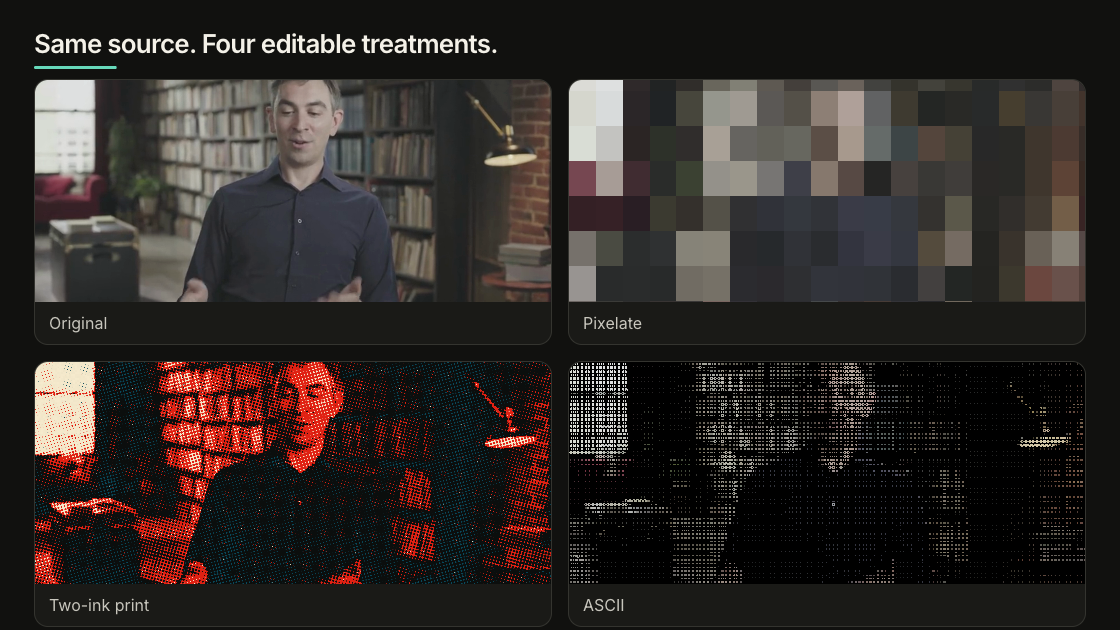
**Print — Halftone, Two-Ink Print, Ordered Dither, Mono Screen.**
Turn the picture into printed dots or a two-color poster.

**Art — ASCII, Engraving, Crosshatch, Kuwahara Paint.**
Redraw the picture as text characters, engraved lines, hatching or paint. ASCII
alone has eight styles, not one switch.

<Frame caption="One source, four finishes: original, pixelated, two-ink print, and ASCII.">
  <img src="https://static.heygen.ai/hyperframes-oss/docs/images/showcase/media-effects-grid-v1.png" alt="One presenter frame shown as the original, pixelated, two-ink print, and ASCII treatments" />
</Frame>

For grain and darkened edges, use Grain and Vignette in
[Color grading](/guides/color-grading). For a HUD, light leak or flash, use a
[Catalog overlay](/catalog).

## Try one in Studio

Select an image or video, then open **Effects** in the Inspector. Pick one
effect, adjust it, and play the clip all the way through — some effects only
look wrong once things move.

An effect covers the whole media layer. It does not follow a face, a screen or
an object. If only part of the frame should change, crop or mask that part into
its own layer first.

Blur, Bloom and Kuwahara Paint are the expensive ones. Several of them stacked
across large layers will slow down both preview and rendering.

## Or just ask the agent

Describe what you want it to look like. You do not need to know the control
names:

```text theme={null}
Make this product clip feel like a clean two-ink editorial print.
Keep the product shape and label readable.
```

The agent can look up what is available before it changes anything:

```bash theme={null}
npx hyperframes media-treatment --capabilities --json
npx hyperframes media-treatment --capability twoInkPrint --json
```

Then apply it:

```bash theme={null}
npx hyperframes media-treatment \
  --selector '#product' \
  --grading '{"preset":"two-ink-print"}' \
  --apply --json
```

Add `--dry-run` to see the change without writing it, `--analyze` to measure the
source first, or `--clear` to take an effect off. This writes the same
`data-color-grading` data that Studio reads, so the two never disagree.

## Keeping it useful

Use blur or pixelation when you actually mean to hide or reveal something. If
you pick a strong look, commit to it — a half-strength ASCII just reads as a
mistake. Compare against the original, and take the effect off when it starts
competing with the story.

## Two limits worth knowing

**HDR.** Effects run on the standard (SDR) pipeline. A native HDR layer keeps
its HDR pixels through a separate path, so these effects will not appear on it.
Convert to SDR if the effect has to survive into the final file.

**Remote files.** Keep media inside the project. A file loaded from another
server only works if that server sends the right CORS headers, and it can
disappear between now and render time.

The [Color grading guide](/guides/color-grading) covers correction, curves,
selective color and LUTs. The
[HTML schema](/reference/html-schema#color-grading-and-media-effects) has the
exact data format.

## Related topics

* [Color grade images and footage](/guides/color-grading)
* [Use images and video](/guides/video-components)
* [Browse ready-made visual effects](/catalog)
