> ## Documentation Index
> Fetch the complete documentation index at: https://hyperframes-canary-calibration-notes.mintlify.site/llms.txt
> Use this file to discover all available pages before exploring further.

# Remove a background

> Turn footage of a person or a portrait image into transparent media you can layer over a HyperFrames scene.

export const DocsVideo = ({src, poster, title, autoPlay = false, loop = false, portrait = false}) => {
  const videoRef = useRef(null);
  const playerRef = useRef(null);
  const hideTimerRef = useRef(null);
  const progressFrameRef = useRef(null);
  const [enhanced, setEnhanced] = useState(false);
  const [playing, setPlaying] = useState(false);
  const [waiting, setWaiting] = useState(false);
  const [muted, setMuted] = useState(false);
  const [currentTime, setCurrentTime] = useState(0);
  const [duration, setDuration] = useState(0);
  const [playbackRate, setPlaybackRate] = useState(1);
  const [controlsVisible, setControlsVisible] = useState(false);
  const [fullscreen, setFullscreen] = useState(false);
  const [fullscreenSupported, setFullscreenSupported] = useState(false);
  const [previewing, setPreviewing] = useState(false);
  const [scrubbing, setScrubbing] = useState(false);
  const [previewTime, setPreviewTime] = useState(0);
  const [previewPosition, setPreviewPosition] = useState(0);
  const formatTime = seconds => {
    if (!Number.isFinite(seconds) || seconds < 0) return "0:00";
    const minutes = Math.floor(seconds / 60);
    const remaining = Math.floor(seconds % 60);
    return `${minutes}:${String(remaining).padStart(2, "0")}`;
  };
  const clearHideTimer = () => {
    if (hideTimerRef.current) {
      window.clearTimeout(hideTimerRef.current);
      hideTimerRef.current = null;
    }
  };
  const revealControls = () => {
    setControlsVisible(true);
    clearHideTimer();
    hideTimerRef.current = window.setTimeout(() => setControlsVisible(false), 2200);
  };
  const togglePlayback = async () => {
    const video = videoRef.current;
    if (!video) return;
    if (video.paused || video.ended) {
      if (video.ended) video.currentTime = 0;
      setWaiting(true);
      try {
        await video.play();
      } catch {
        setWaiting(false);
        setPlaying(false);
      }
    } else {
      video.pause();
      setControlsVisible(true);
    }
  };
  const toggleMute = () => {
    const video = videoRef.current;
    if (!video) return;
    if (video.muted && video.volume === 0) video.volume = 0.8;
    video.muted = !video.muted;
    setMuted(video.muted);
  };
  const seek = event => {
    const video = videoRef.current;
    if (!video) return;
    const nextTime = Number(event.target.value);
    video.currentTime = nextTime;
    setCurrentTime(nextTime);
  };
  const updateScrubPreview = (event, seekMainVideo = false) => {
    if (!duration) return;
    const rect = event.currentTarget.getBoundingClientRect();
    const ratio = Math.min(1, Math.max(0, (event.clientX - rect.left) / rect.width));
    const nextTime = ratio * duration;
    setPreviewing(true);
    setPreviewTime(nextTime);
    setPreviewPosition(ratio * 100);
    if (seekMainVideo) {
      const video = videoRef.current;
      if (video) {
        video.currentTime = nextTime;
        setCurrentTime(nextTime);
      }
    }
  };
  const cyclePlaybackRate = () => {
    const video = videoRef.current;
    if (!video) return;
    const rates = [1, 1.25, 1.5, 2];
    const currentIndex = rates.indexOf(video.playbackRate);
    const nextRate = rates[(currentIndex + 1) % rates.length];
    video.playbackRate = nextRate;
    setPlaybackRate(nextRate);
  };
  const toggleFullscreen = async () => {
    const player = playerRef.current;
    const video = videoRef.current;
    if (!player || typeof document === "undefined") return;
    try {
      if (document.fullscreenElement) {
        await document.exitFullscreen();
      } else if (player.requestFullscreen) {
        await player.requestFullscreen();
      } else if (video?.webkitEnterFullscreen) {
        video.webkitEnterFullscreen();
      }
    } catch {}
  };
  const handleKeyboard = event => {
    if (event.target !== event.currentTarget) return;
    const video = videoRef.current;
    if (!video) return;
    if (event.key === " " || event.key === "Enter") {
      event.preventDefault();
      togglePlayback();
    } else if (event.key === "ArrowLeft") {
      event.preventDefault();
      video.currentTime = Math.max(0, video.currentTime - 5);
    } else if (event.key === "ArrowRight") {
      event.preventDefault();
      video.currentTime = Math.min(duration || video.duration || 0, video.currentTime + 5);
    } else if (event.key.toLowerCase() === "m") {
      event.preventDefault();
      toggleMute();
    } else if (event.key.toLowerCase() === "f") {
      event.preventDefault();
      toggleFullscreen();
    }
  };
  useEffect(() => {
    setEnhanced(true);
    setFullscreenSupported(Boolean(playerRef.current?.requestFullscreen || videoRef.current?.webkitEnterFullscreen));
    return () => {
      clearHideTimer();
    };
  }, []);
  useEffect(() => {
    if (typeof document === "undefined") return undefined;
    const syncFullscreen = () => setFullscreen(document.fullscreenElement === playerRef.current);
    document.addEventListener("fullscreenchange", syncFullscreen);
    return () => document.removeEventListener("fullscreenchange", syncFullscreen);
  }, []);
  useEffect(() => {
    clearHideTimer();
    if (!playing) return undefined;
    hideTimerRef.current = window.setTimeout(() => setControlsVisible(false), 2200);
    return clearHideTimer;
  }, [playing]);
  useEffect(() => {
    if (!playing) return undefined;
    const updateProgress = () => {
      const video = videoRef.current;
      if (video && !video.paused) setCurrentTime(video.currentTime);
      progressFrameRef.current = window.requestAnimationFrame(updateProgress);
    };
    progressFrameRef.current = window.requestAnimationFrame(updateProgress);
    return () => {
      if (progressFrameRef.current) window.cancelAnimationFrame(progressFrameRef.current);
      progressFrameRef.current = null;
    };
  }, [playing]);
  const progress = duration > 0 ? currentTime / duration * 100 : 0;
  const replaying = duration > 0 && currentTime >= duration - 0.15;
  return <div className="hf-docs-video-block" data-portrait={portrait ? "true" : "false"}>
      <div ref={playerRef} className="hf-docs-video" role="region" aria-label={title} tabIndex={0} onKeyDown={handleKeyboard} onPointerMove={revealControls} onPointerLeave={() => setControlsVisible(false)} onFocus={revealControls} onBlur={event => {
    if (!event.currentTarget.contains(event.relatedTarget)) setControlsVisible(false);
  }}>
        <video ref={videoRef} aria-label={title} src={src} poster={poster} autoPlay={autoPlay} loop={loop} playsInline preload="metadata" controls={!enhanced} onClick={togglePlayback} onDoubleClick={toggleFullscreen} onLoadedMetadata={event => {
    const nextDuration = event.currentTarget.duration || 0;
    setDuration(nextDuration);
    setMuted(event.currentTarget.muted);
  }} onDurationChange={event => setDuration(event.currentTarget.duration || 0)} onTimeUpdate={event => setCurrentTime(event.currentTarget.currentTime)} onPlay={() => setPlaying(true)} onPause={() => setPlaying(false)} onPlaying={() => setWaiting(false)} onWaiting={() => setWaiting(true)} onCanPlay={() => setWaiting(false)} onEnded={() => {
    setPlaying(false);
    setControlsVisible(true);
  }} onVolumeChange={event => setMuted(event.currentTarget.muted)} />

        {enhanced && <>
            {!playing && (currentTime <= 0.2 || replaying) && <button type="button" className="hf-docs-video-hero-play" onClick={togglePlayback} aria-label={replaying ? "Replay video" : "Play video"}>
                <span className="hf-docs-video-hero-icon" aria-hidden="true">
                  <svg viewBox="0 0 24 24">
                    <path d="M8 5.5v13l10-6.5z" />
                  </svg>
                </span>
              </button>}

            {waiting && playing && <span className="hf-docs-video-spinner" aria-label="Loading" />}

            <div className="hf-docs-video-controls" data-visible={controlsVisible ? "true" : "false"}>
              <div className="hf-docs-video-scrub-preview" data-visible={previewing ? "true" : "false"} style={{
    "--hf-video-preview-x": `${previewPosition}%`
  }} aria-hidden="true">
                <span>{formatTime(previewTime)}</span>
              </div>

              <input className="hf-docs-video-progress" type="range" min="0" max={duration || 0} step="0.01" value={Math.min(currentTime, duration || 0)} aria-label="Video progress" aria-valuetext={`${formatTime(currentTime)} of ${formatTime(duration)}`} onChange={seek} onPointerEnter={updateScrubPreview} onPointerMove={event => updateScrubPreview(event, scrubbing || event.buttons === 1)} onPointerDown={event => {
    setScrubbing(true);
    event.currentTarget.setPointerCapture?.(event.pointerId);
    updateScrubPreview(event, true);
  }} onPointerUp={event => {
    setScrubbing(false);
    if (event.pointerType !== "mouse") setPreviewing(false);
  }} onPointerCancel={() => {
    setScrubbing(false);
    setPreviewing(false);
  }} onPointerLeave={() => {
    if (!scrubbing) setPreviewing(false);
  }} style={{
    "--hf-video-progress": `${progress}%`
  }} />

              <div className="hf-docs-video-control-row">
                <button type="button" className="hf-docs-video-control" onClick={togglePlayback} aria-label={playing ? "Pause video" : "Play video"}>
                  {playing ? <svg viewBox="0 0 24 24" aria-hidden="true">
                      <path d="M7 5h4v14H7zm6 0h4v14h-4z" />
                    </svg> : <svg viewBox="0 0 24 24" aria-hidden="true">
                      <path d="M8 5.5v13l10-6.5z" />
                    </svg>}
                </button>

                <button type="button" className="hf-docs-video-control" onClick={toggleMute} aria-label={muted ? "Unmute video" : "Mute video"}>
                  {muted ? <svg viewBox="0 0 24 24" aria-hidden="true">
                      <path d="M4 9v6h4l5 4V5L8 9zm11.5 1.1 1.4-1.4 1.6 1.6 1.6-1.6 1.4 1.4-1.6 1.6 1.6 1.6-1.4 1.4-1.6-1.6-1.6 1.6-1.4-1.4 1.6-1.6z" />
                    </svg> : <svg viewBox="0 0 24 24" aria-hidden="true">
                      <path d="M4 9v6h4l5 4V5L8 9zm11 1.2v3.6c1-.5 1.7-1.5 1.7-2.8S16 10.7 15 10.2zm0-4v2.1c2.2.6 3.7 2.5 3.7 4.7s-1.5 4.1-3.7 4.7v2.1c3.3-.7 5.7-3.5 5.7-6.8S18.3 6.9 15 6.2z" />
                    </svg>}
                </button>

                <span className="hf-docs-video-time" aria-hidden="true">
                  {formatTime(currentTime)} <span>/</span> {formatTime(duration)}
                </span>

                <span className="hf-docs-video-spacer" />

                <button type="button" className="hf-docs-video-rate" onClick={cyclePlaybackRate} aria-label={`Playback speed ${playbackRate} times`}>
                  {playbackRate}×
                </button>

                {fullscreenSupported && <button type="button" className="hf-docs-video-control" onClick={toggleFullscreen} aria-label={fullscreen ? "Exit fullscreen" : "Enter fullscreen"}>
                    {fullscreen ? <svg viewBox="0 0 24 24" aria-hidden="true">
                        <path d="M8 3H6v3H3v2h5zm8 0v5h5V6h-3V3zM3 16v2h3v3h2v-5zm13 0v5h2v-3h3v-2z" />
                      </svg> : <svg viewBox="0 0 24 24" aria-hidden="true">
                        <path d="M3 8h2V5h3V3H3zm13-5v2h3v3h2V3zM5 16H3v5h5v-2H5zm14 3h-3v2h5v-5h-2z" />
                      </svg>}
                  </button>}
              </div>
            </div>
          </>}
      </div>

    </div>;
};

Use background removal when a person needs to appear over designed text,
graphics, or another scene. HyperFrames runs the included human-segmentation
model locally; it does not upload the source or require an API key.

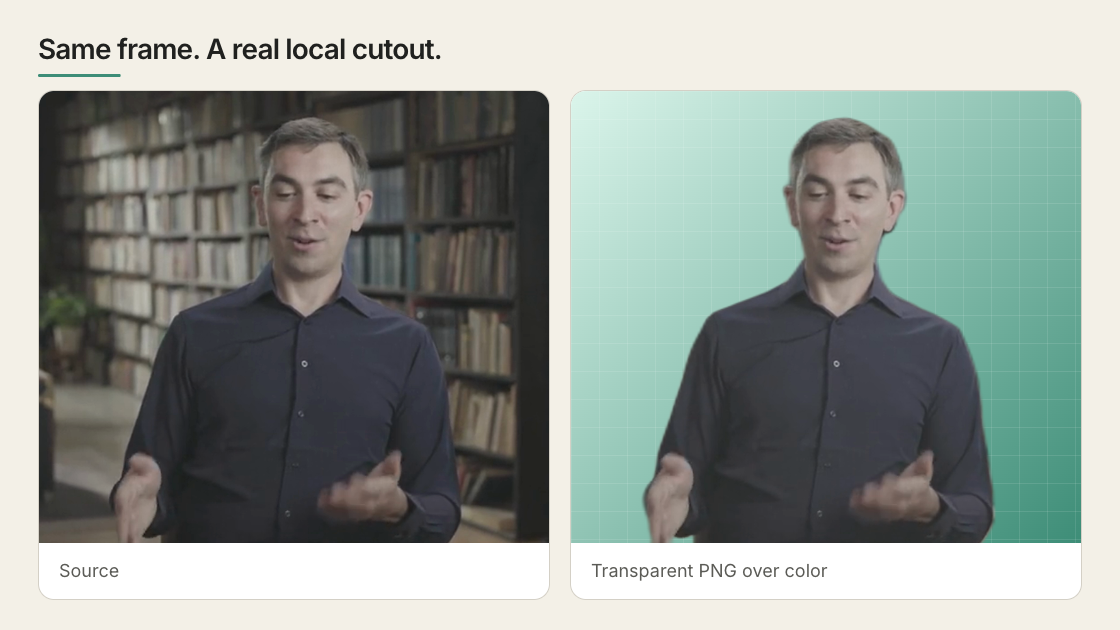
<Frame caption="The same real frame before and after the local model. The softer hair and hand edges are the model’s actual limit on this source.">
  <img src="https://static.heygen.ai/hyperframes-oss/docs/images/showcase/remove-background-before-after-v1.png" alt="The original presenter frame beside its transparent cutout over a green background" />
</Frame>

<DocsVideo title="A presenter cut out of a real room, shown against the original and magnified at the hard edges" src="https://static.heygen.ai/hyperframes-oss/docs/images/showcase/remove-background-demo-v3.mp4" poster="https://static.heygen.ai/hyperframes-oss/docs/images/showcase/remove-background-demo-v1.jpg" />

Every frame is real CLI output. The magnified panels sit on the hair edge and on
a shoulder a plant used to overlap, because those are where matting usually fails.

## Create the transparent file

Make sure FFmpeg is installed, then run:

```bash theme={null}
npx hyperframes remove-background subject.mp4 -o subject.webm
```

The first run downloads the model. Later runs reuse it.

Choose the output by destination:

| Output              | Use it for                                                       |
| ------------------- | ---------------------------------------------------------------- |
| Transparent `.webm` | A subject layered inside a web or HyperFrames composition        |
| Transparent `.mov`  | A ProRes 4444 round trip through Premiere, Resolve, or Final Cut |
| Transparent `.png`  | A single portrait image                                          |

```bash theme={null}
npx hyperframes remove-background subject.mp4 -o subject.mov
npx hyperframes remove-background portrait.jpg -o portrait.png
```

## Use the cutout

Import the transparent file into the project and place it above the
background, text, or graphic it should cover. Then check the complete clip,
especially hair, hands, fast movement, and the first and last frames.

If you animate the subject, animate a wrapper around the video. This keeps the
transparent media and the composition’s timing behavior together.

## Compositing patterns and pitfalls

Keep the media element stable and animate a wrapper when the cutout must move,
resize, or reveal. This avoids mixing media playback with the transform that
controls the composition.

When a cutout and its original background must remain frame-aligned, give both
media elements the same `data-start` and playback offset. Hide or reveal them
through wrappers instead of mounting one source later. Then scrub the cut point
and check the rendered frame, not only normal playback.

## Put something behind the subject

For text-behind-subject or another three-layer effect, you can create both the
foreground cutout and an inverse-alpha background plate in one pass:

```bash theme={null}
npx hyperframes remove-background subject.mp4 \
  -o subject.webm \
  --background-output plate.webm
```

The plate keeps the original surroundings and leaves a transparent
person-shaped hole. It is not an inpainted empty background. Place an opaque
graphic or scene beneath the hole, then place `subject.webm` above it.

## Know when it will work well

The included model is designed for people. It works best with a clear human
subject, stable framing, and reasonable contrast from the background.

Use another segmentation or masking tool when:

* the subject is a product, animal, or other object;
* fine hair crosses a busy background;
* frame-to-frame edge stability must meet high-end VFX standards;
* you need the original background reconstructed after removing the person.

Background removal is preprocessing. Run it once, keep the transparent result
in the project, and reuse it.

## Balance quality and speed

`--device auto` chooses the best available local provider. Inspect the detected
provider with:

```bash theme={null}
npx hyperframes remove-background --info
```

For WebM output, `--quality balanced` is the default. Use `best` when the
cutout sits directly over its original source and edge color must match; use
`fast` for a smaller file over an unrelated background.

## Common problems

| Problem                           | What to check                                                                                   |
| --------------------------------- | ----------------------------------------------------------------------------------------------- |
| The background is still opaque    | Confirm the output is transparent WebM, MOV, or PNG and preview it over a colored background.   |
| Edges flicker                     | Use a cleaner source, reduce fast movement, or use a stronger external matting tool.            |
| Processing is slow                | Check `--info`; CPU processing works but is much slower than an available accelerated provider. |
| The subject has a color halo      | Use `--quality best`, especially when layering over the original source.                        |
| The “background plate” has a hole | Expected: it is inverse alpha, not an inpainted clean plate.                                    |

The [CLI reference](/packages/cli#remove-background) lists every flag and
supported input.

## Related topics

* [Use images and video](/guides/video-components)
* [Add an avatar presenter](/guides/avatar-presenter)
* [Apply media effects without changing the source file](/guides/media-effects)