> ## Documentation Index
> Fetch the complete documentation index at: https://hyperframes-canary-calibration-notes.mintlify.site/llms.txt
> Use this file to discover all available pages before exploring further.

# Work on a project in Studio

> Open a HyperFrames project, understand the workspace, make a safe edit, and finish a version.

export const DocsVideo = ({src, poster, title, autoPlay = false, loop = false, portrait = false}) => {
  const videoRef = useRef(null);
  const playerRef = useRef(null);
  const hideTimerRef = useRef(null);
  const progressFrameRef = useRef(null);
  const [enhanced, setEnhanced] = useState(false);
  const [playing, setPlaying] = useState(false);
  const [waiting, setWaiting] = useState(false);
  const [muted, setMuted] = useState(false);
  const [currentTime, setCurrentTime] = useState(0);
  const [duration, setDuration] = useState(0);
  const [playbackRate, setPlaybackRate] = useState(1);
  const [controlsVisible, setControlsVisible] = useState(false);
  const [fullscreen, setFullscreen] = useState(false);
  const [fullscreenSupported, setFullscreenSupported] = useState(false);
  const [previewing, setPreviewing] = useState(false);
  const [scrubbing, setScrubbing] = useState(false);
  const [previewTime, setPreviewTime] = useState(0);
  const [previewPosition, setPreviewPosition] = useState(0);
  const formatTime = seconds => {
    if (!Number.isFinite(seconds) || seconds < 0) return "0:00";
    const minutes = Math.floor(seconds / 60);
    const remaining = Math.floor(seconds % 60);
    return `${minutes}:${String(remaining).padStart(2, "0")}`;
  };
  const clearHideTimer = () => {
    if (hideTimerRef.current) {
      window.clearTimeout(hideTimerRef.current);
      hideTimerRef.current = null;
    }
  };
  const revealControls = () => {
    setControlsVisible(true);
    clearHideTimer();
    hideTimerRef.current = window.setTimeout(() => setControlsVisible(false), 2200);
  };
  const togglePlayback = async () => {
    const video = videoRef.current;
    if (!video) return;
    if (video.paused || video.ended) {
      if (video.ended) video.currentTime = 0;
      setWaiting(true);
      try {
        await video.play();
      } catch {
        setWaiting(false);
        setPlaying(false);
      }
    } else {
      video.pause();
      setControlsVisible(true);
    }
  };
  const toggleMute = () => {
    const video = videoRef.current;
    if (!video) return;
    if (video.muted && video.volume === 0) video.volume = 0.8;
    video.muted = !video.muted;
    setMuted(video.muted);
  };
  const seek = event => {
    const video = videoRef.current;
    if (!video) return;
    const nextTime = Number(event.target.value);
    video.currentTime = nextTime;
    setCurrentTime(nextTime);
  };
  const updateScrubPreview = (event, seekMainVideo = false) => {
    if (!duration) return;
    const rect = event.currentTarget.getBoundingClientRect();
    const ratio = Math.min(1, Math.max(0, (event.clientX - rect.left) / rect.width));
    const nextTime = ratio * duration;
    setPreviewing(true);
    setPreviewTime(nextTime);
    setPreviewPosition(ratio * 100);
    if (seekMainVideo) {
      const video = videoRef.current;
      if (video) {
        video.currentTime = nextTime;
        setCurrentTime(nextTime);
      }
    }
  };
  const cyclePlaybackRate = () => {
    const video = videoRef.current;
    if (!video) return;
    const rates = [1, 1.25, 1.5, 2];
    const currentIndex = rates.indexOf(video.playbackRate);
    const nextRate = rates[(currentIndex + 1) % rates.length];
    video.playbackRate = nextRate;
    setPlaybackRate(nextRate);
  };
  const toggleFullscreen = async () => {
    const player = playerRef.current;
    const video = videoRef.current;
    if (!player || typeof document === "undefined") return;
    try {
      if (document.fullscreenElement) {
        await document.exitFullscreen();
      } else if (player.requestFullscreen) {
        await player.requestFullscreen();
      } else if (video?.webkitEnterFullscreen) {
        video.webkitEnterFullscreen();
      }
    } catch {}
  };
  const handleKeyboard = event => {
    if (event.target !== event.currentTarget) return;
    const video = videoRef.current;
    if (!video) return;
    if (event.key === " " || event.key === "Enter") {
      event.preventDefault();
      togglePlayback();
    } else if (event.key === "ArrowLeft") {
      event.preventDefault();
      video.currentTime = Math.max(0, video.currentTime - 5);
    } else if (event.key === "ArrowRight") {
      event.preventDefault();
      video.currentTime = Math.min(duration || video.duration || 0, video.currentTime + 5);
    } else if (event.key.toLowerCase() === "m") {
      event.preventDefault();
      toggleMute();
    } else if (event.key.toLowerCase() === "f") {
      event.preventDefault();
      toggleFullscreen();
    }
  };
  useEffect(() => {
    setEnhanced(true);
    setFullscreenSupported(Boolean(playerRef.current?.requestFullscreen || videoRef.current?.webkitEnterFullscreen));
    return () => {
      clearHideTimer();
    };
  }, []);
  useEffect(() => {
    if (typeof document === "undefined") return undefined;
    const syncFullscreen = () => setFullscreen(document.fullscreenElement === playerRef.current);
    document.addEventListener("fullscreenchange", syncFullscreen);
    return () => document.removeEventListener("fullscreenchange", syncFullscreen);
  }, []);
  useEffect(() => {
    clearHideTimer();
    if (!playing) return undefined;
    hideTimerRef.current = window.setTimeout(() => setControlsVisible(false), 2200);
    return clearHideTimer;
  }, [playing]);
  useEffect(() => {
    if (!playing) return undefined;
    const updateProgress = () => {
      const video = videoRef.current;
      if (video && !video.paused) setCurrentTime(video.currentTime);
      progressFrameRef.current = window.requestAnimationFrame(updateProgress);
    };
    progressFrameRef.current = window.requestAnimationFrame(updateProgress);
    return () => {
      if (progressFrameRef.current) window.cancelAnimationFrame(progressFrameRef.current);
      progressFrameRef.current = null;
    };
  }, [playing]);
  const progress = duration > 0 ? currentTime / duration * 100 : 0;
  const replaying = duration > 0 && currentTime >= duration - 0.15;
  return <div className="hf-docs-video-block" data-portrait={portrait ? "true" : "false"}>
      <div ref={playerRef} className="hf-docs-video" role="region" aria-label={title} tabIndex={0} onKeyDown={handleKeyboard} onPointerMove={revealControls} onPointerLeave={() => setControlsVisible(false)} onFocus={revealControls} onBlur={event => {
    if (!event.currentTarget.contains(event.relatedTarget)) setControlsVisible(false);
  }}>
        <video ref={videoRef} aria-label={title} src={src} poster={poster} autoPlay={autoPlay} loop={loop} playsInline preload="metadata" controls={!enhanced} onClick={togglePlayback} onDoubleClick={toggleFullscreen} onLoadedMetadata={event => {
    const nextDuration = event.currentTarget.duration || 0;
    setDuration(nextDuration);
    setMuted(event.currentTarget.muted);
  }} onDurationChange={event => setDuration(event.currentTarget.duration || 0)} onTimeUpdate={event => setCurrentTime(event.currentTarget.currentTime)} onPlay={() => setPlaying(true)} onPause={() => setPlaying(false)} onPlaying={() => setWaiting(false)} onWaiting={() => setWaiting(true)} onCanPlay={() => setWaiting(false)} onEnded={() => {
    setPlaying(false);
    setControlsVisible(true);
  }} onVolumeChange={event => setMuted(event.currentTarget.muted)} />

        {enhanced && <>
            {!playing && (currentTime <= 0.2 || replaying) && <button type="button" className="hf-docs-video-hero-play" onClick={togglePlayback} aria-label={replaying ? "Replay video" : "Play video"}>
                <span className="hf-docs-video-hero-icon" aria-hidden="true">
                  <svg viewBox="0 0 24 24">
                    <path d="M8 5.5v13l10-6.5z" />
                  </svg>
                </span>
              </button>}

            {waiting && playing && <span className="hf-docs-video-spinner" aria-label="Loading" />}

            <div className="hf-docs-video-controls" data-visible={controlsVisible ? "true" : "false"}>
              <div className="hf-docs-video-scrub-preview" data-visible={previewing ? "true" : "false"} style={{
    "--hf-video-preview-x": `${previewPosition}%`
  }} aria-hidden="true">
                <span>{formatTime(previewTime)}</span>
              </div>

              <input className="hf-docs-video-progress" type="range" min="0" max={duration || 0} step="0.01" value={Math.min(currentTime, duration || 0)} aria-label="Video progress" aria-valuetext={`${formatTime(currentTime)} of ${formatTime(duration)}`} onChange={seek} onPointerEnter={updateScrubPreview} onPointerMove={event => updateScrubPreview(event, scrubbing || event.buttons === 1)} onPointerDown={event => {
    setScrubbing(true);
    event.currentTarget.setPointerCapture?.(event.pointerId);
    updateScrubPreview(event, true);
  }} onPointerUp={event => {
    setScrubbing(false);
    if (event.pointerType !== "mouse") setPreviewing(false);
  }} onPointerCancel={() => {
    setScrubbing(false);
    setPreviewing(false);
  }} onPointerLeave={() => {
    if (!scrubbing) setPreviewing(false);
  }} style={{
    "--hf-video-progress": `${progress}%`
  }} />

              <div className="hf-docs-video-control-row">
                <button type="button" className="hf-docs-video-control" onClick={togglePlayback} aria-label={playing ? "Pause video" : "Play video"}>
                  {playing ? <svg viewBox="0 0 24 24" aria-hidden="true">
                      <path d="M7 5h4v14H7zm6 0h4v14h-4z" />
                    </svg> : <svg viewBox="0 0 24 24" aria-hidden="true">
                      <path d="M8 5.5v13l10-6.5z" />
                    </svg>}
                </button>

                <button type="button" className="hf-docs-video-control" onClick={toggleMute} aria-label={muted ? "Unmute video" : "Mute video"}>
                  {muted ? <svg viewBox="0 0 24 24" aria-hidden="true">
                      <path d="M4 9v6h4l5 4V5L8 9zm11.5 1.1 1.4-1.4 1.6 1.6 1.6-1.6 1.4 1.4-1.6 1.6 1.6 1.6-1.4 1.4-1.6-1.6-1.6 1.6-1.4-1.4 1.6-1.6z" />
                    </svg> : <svg viewBox="0 0 24 24" aria-hidden="true">
                      <path d="M4 9v6h4l5 4V5L8 9zm11 1.2v3.6c1-.5 1.7-1.5 1.7-2.8S16 10.7 15 10.2zm0-4v2.1c2.2.6 3.7 2.5 3.7 4.7s-1.5 4.1-3.7 4.7v2.1c3.3-.7 5.7-3.5 5.7-6.8S18.3 6.9 15 6.2z" />
                    </svg>}
                </button>

                <span className="hf-docs-video-time" aria-hidden="true">
                  {formatTime(currentTime)} <span>/</span> {formatTime(duration)}
                </span>

                <span className="hf-docs-video-spacer" />

                <button type="button" className="hf-docs-video-rate" onClick={cyclePlaybackRate} aria-label={`Playback speed ${playbackRate} times`}>
                  {playbackRate}×
                </button>

                {fullscreenSupported && <button type="button" className="hf-docs-video-control" onClick={toggleFullscreen} aria-label={fullscreen ? "Exit fullscreen" : "Enter fullscreen"}>
                    {fullscreen ? <svg viewBox="0 0 24 24" aria-hidden="true">
                        <path d="M8 3H6v3H3v2h5zm8 0v5h5V6h-3V3zM3 16v2h3v3h2v-5zm13 0v5h2v-3h3v-2z" />
                      </svg> : <svg viewBox="0 0 24 24" aria-hidden="true">
                        <path d="M3 8h2V5h3V3H3zm13-5v2h3v3h2V3zM5 16H3v5h5v-2H5zm14 3h-3v2h5v-5h-2z" />
                      </svg>}
                  </button>}
              </div>
            </div>
          </>}
      </div>

    </div>;
};

<div className="hf-docs-video-frame">
  <DocsVideo title="A narrated tour of a real HyperFrames Studio project" src="https://static.heygen.ai/hyperframes-oss/docs/images/showcase/studio-front-door-v2.mp4" poster="https://static.heygen.ai/hyperframes-oss/docs/images/showcase/studio-front-door-v2.jpg" />
</div>

Studio is the visual editor for the same HTML project your agent and the CLI
use. Any HyperFrames project opens here without an import or conversion. Open any project folder, then run:

```bash theme={null}
npx hyperframes preview
```

## Know the workspace

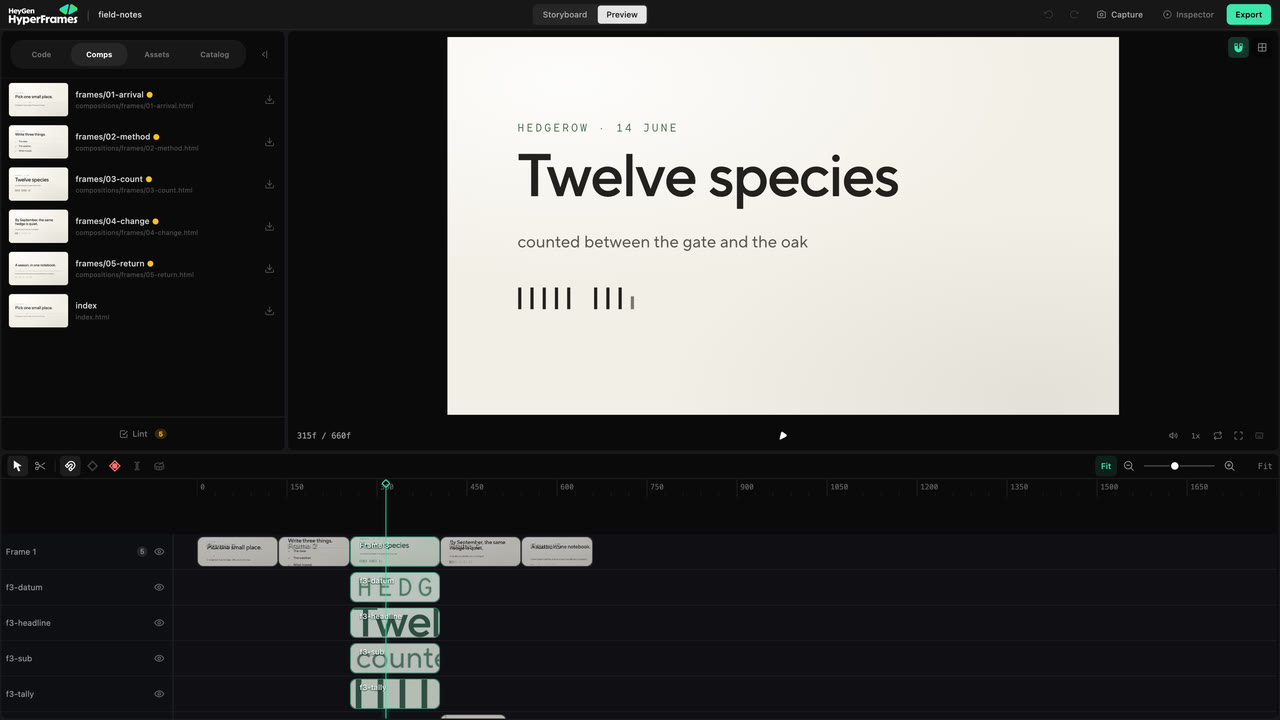
<Frame caption="Preview keeps project files, the live frame, the Inspector, and time-based editing in one workspace.">
  <img src="https://static.heygen.ai/hyperframes-oss/docs/images/studio/overview-v1.jpg" alt="HyperFrames Studio Preview showing project tools, a live composition, the Inspector, and the timeline" />
</Frame>

* **Storyboard** shows the planned sequence, direction, voiceover, status, and
  comments. Use it to review the story.
* **Preview** shows the built project. The live frame is in the middle, the
  timeline is below, project tools are on the left, and the Inspector is on the
  right.
* **Code**, **Comps**, **Assets**, and **Catalog** expose the project source,
  compositions, media, and reusable visuals. **Design**, **Layers**,
  **Variables**, and **Renders** control the selected work.

You do not need to learn every panel. Choose the surface that matches the
problem in front of you.

| You want to change                              | Start with                       |
| ----------------------------------------------- | -------------------------------- |
| Something visible in the current frame          | Canvas, then Design or Layers    |
| When something appears or how long it stays     | Timeline                         |
| One movement or transition                      | Animation controls and keyframes |
| The story, several scenes, or project structure | Your agent                       |

## Make one safe edit

Pause where the problem is visible. Click the element on the canvas, or choose
it in **Layers** when several elements overlap. Then change only the property
you meant to change.

<div style={{ maxWidth: "42rem", margin: "1.5rem auto" }}>
  <Frame caption="The canvas selects the visible element; Design exposes the properties Studio can edit safely.">
    <video src="https://static.heygen.ai/hyperframes-oss/docs/images/showcase/studio-direct-edit-loop-v2.mp4" poster="https://static.heygen.ai/hyperframes-oss/docs/images/showcase/studio-direct-edit-loop-v2.jpg" alt="Selecting an element and changing it in HyperFrames Studio" aria-label="Selecting an element and changing it in HyperFrames Studio" autoPlay muted loop playsInline preload="metadata" />
  </Frame>
</div>

Use the canvas to move, resize, rotate, or crop a supported element. Use
**Design** for text, layout, style, media, motion, 3D, or color controls that
apply to the selection. Play through the surrounding moment before accepting
the change; a correct still frame can still create a collision in motion.

<Warning>
  Auto-keyframe starts enabled. Turn it off before a normal layout correction that should stay
  constant. Leave it on only when the change at the current playhead time should become animation.
</Warning>

For the complete visible-edit workflow, continue to [Edit the
frame](/studio/canvas).

## Change time on the timeline

Drag a clip to move it earlier or later. Drag an edge to change its duration.
Use the razor only when one supported clip must become two.

<div style={{ maxWidth: "42rem", margin: "1.5rem auto" }}>
  <Frame caption="Timing changes stay visible beside the frame and neighboring tracks.">
    <video src="https://static.heygen.ai/hyperframes-oss/docs/images/showcase/studio-timing-loop-v2.mp4" poster="https://static.heygen.ai/hyperframes-oss/docs/images/showcase/studio-timing-loop-v2.jpg" alt="Adjusting clip timing in the HyperFrames Studio timeline" aria-label="Adjusting clip timing in the HyperFrames Studio timeline" autoPlay muted loop playsInline preload="metadata" />
  </Frame>
</div>

Move the playhead through the surrounding cut after every timing change. Use
[the timeline guide](/studio/timeline) when you need trimming, splitting,
beats, nested scenes, or multi-item editing.

## Hand a broader change back to the agent

Studio is best for a change you can point at. Ask the agent when the request
affects the story, several scenes, source research, or unfamiliar project code.

Use **Ask agent** or **Copy to Agent** when Studio offers it, then add the human
intent that the copied context cannot know:

```text theme={null}
Make the opening feel faster, but keep the current narration and final scene.
```

The agent and Studio edit the same source. There is no export or conversion
between them.

## Check and render the version

Watch the project from the beginning, run **Lint**, and fix the reported issues.
Before delivery, run the project-level browser gate as well:

```bash theme={null}
npx hyperframes check
```

Then render through Studio, your agent, or the CLI. Open the exported file and
watch it once before sharing it.

<div style={{ maxWidth: "42rem", margin: "1.5rem auto" }}>
  <Frame caption="Studio queues and monitors a render from the same project.">
    <video src="https://static.heygen.ai/hyperframes-oss/docs/images/showcase/studio-check-render-loop-v2.mp4" poster="https://static.heygen.ai/hyperframes-oss/docs/images/showcase/studio-check-render-loop-v2.jpg" alt="Queuing and monitoring a render in HyperFrames Studio" aria-label="Queuing and monitoring a render in HyperFrames Studio" autoPlay muted loop playsInline preload="metadata" />
  </Frame>
</div>

## Related topics

<CardGroup cols={2}>
  <Card title="Edit the frame" icon="crop" href="/studio/canvas">
    Select, style, arrange, group, and replace visible elements.
  </Card>

  <Card title="Edit timing" icon="timeline" href="/studio/timeline">
    Trim, split, move, and retime clips on the project timeline.
  </Card>

  <Card title="Finish and share" icon="circle-check" href="/guides/export-and-share">
    Review, validate, render, and deliver the project.
  </Card>
</CardGroup>
